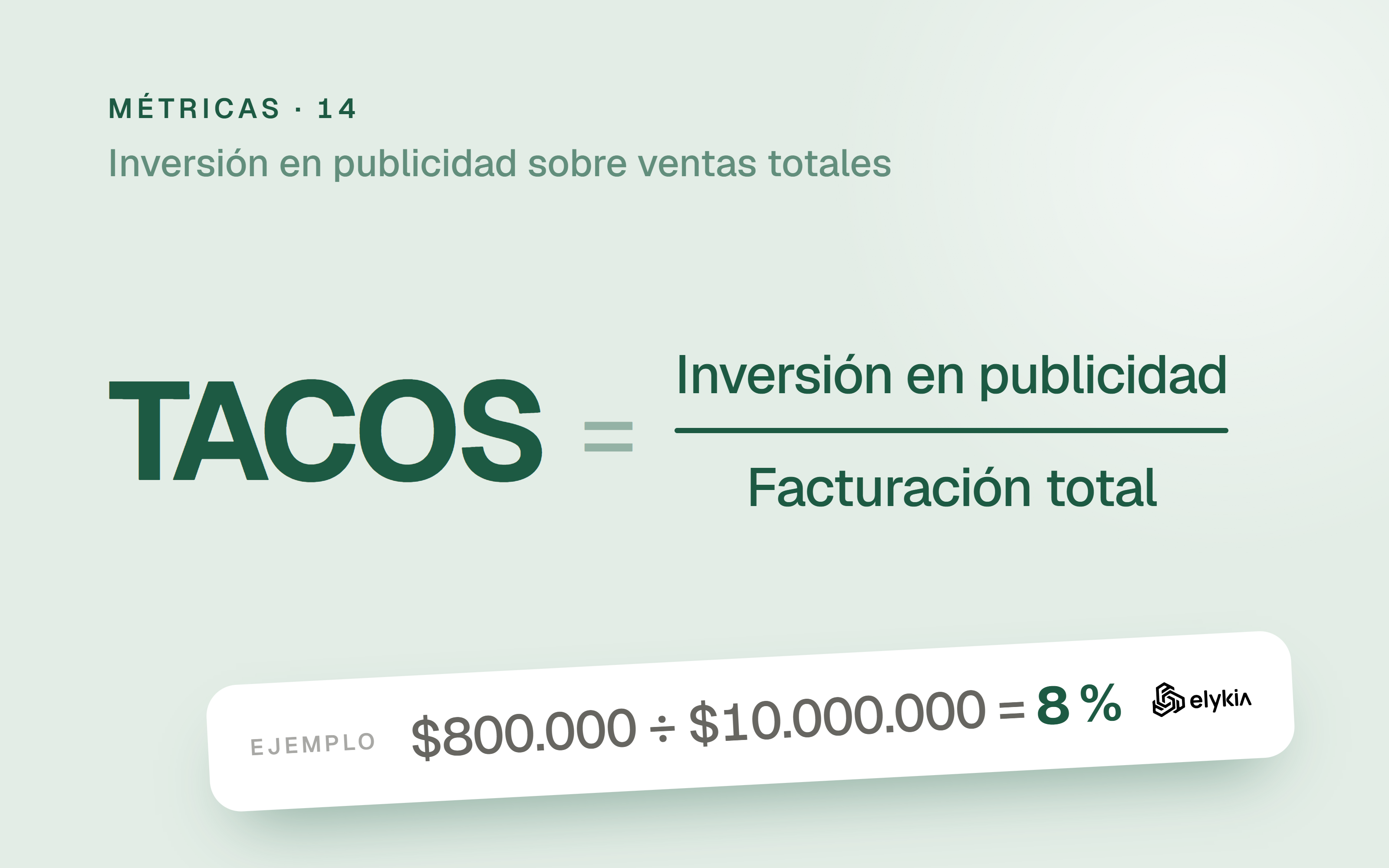
TACOS (total advertising cost of sales) is the share of everything you sell that goes to advertising. You calculate it by dividing ad spend by total revenue, and it's expressed as a percentage. Its sibling, ACOS, does the same math but only with the sales your ads brought in.
It looks simple, and for your business as a whole, it is. The problem comes when you want the ACOS for each campaign: platforms claim more sales than they drove, miss purchases because of iOS and ad blockers, and only see what happens inside their attribution window, which in Meta is 7 days from the click.
The result: Meta tells you your campaign has a 13% ACOS, when it's actually 20%.
Summary
- TACOS = ad spend ÷ total revenue.
- ACOS divides only by the sales your ads brought in, so it always comes out higher than TACOS.
- If you calculate each campaign's ACOS using what Meta, Google, or Mercado Libre report, the number doesn't reflect reality. We explain why below.
How do you calculate TACOS and ACOS?
TACOS = ad spend for the period ÷ total revenue for the period
ACOS = ad spend for the period ÷ sales your ads brought in
- Ad spend: what you spent on ads during the period, adding up Meta, Google, Mercado Ads, and everything else.
- Total revenue: everything you sold in that period, whether it came from an ad or not.
Both metrics were born on Amazon and Mercado Libre, where people talk about "how much it costs me to sell" instead of "how much I get back." They're ROAS and MER flipped upside down: a 20% ACOS is a ROAS of 5, and an 8% TACOS is a MER of 12.5.
Example: TACOS for a Shopify store
A Shopify store spends $800.000 on Meta in October and brings in $10.000.000 in total revenue:
| October | |
|---|---|
| Ad spend | $800.000 |
| Sales your ads brought in | $4.000.000 |
| Total revenue | $10.000.000 |
| ACOS = $800.000 ÷ $4.000.000 | 20% |
| TACOS = $800.000 ÷ $10.000.000 | 8% |
Both figures come from the same spend. ACOS says advertising eats 20% of what it sells; TACOS says it eats 8% of the whole business.
How is TACOS different from ACOS?
| ACOS | TACOS | |
|---|---|---|
| Divides by | The sales your ads brought in | All revenue |
| It's the inverse of | ROAS | MER |
| What it's for | Seeing whether a campaign sells cheaply | Seeing how much advertising weighs on the business |
Looked at together, they tell you something neither one tells you alone. If ACOS holds steady and TACOS drops month over month, advertising is growing the sales that don't come through an ad: people who discovered you through one and then come back on their own, or products that climb in Mercado Libre's search results because they're selling more.
What's a good TACOS?
A TACOS is good when what advertising takes is well below what you keep from each sale. That's the limit: if you spend more on ads than you make on what you sell, you lose money.
In the example, the store keeps $40 of every $100 it sells, after product cost, taxes, fees, and shipping (its contribution margin):
- With a 20% ACOS, the campaign takes half of what each sale leaves. Worth it.
- With a 40% ACOS, the campaign takes everything each sale leaves: that's its break-even point, the same as a break-even ROAS of 2.5.
- With an 8% TACOS, the business keeps 32 of every 100 to pay salaries, rent, and the rest of its fixed costs.
Why is the ACOS the platforms show you wrong?
You can calculate TACOS for your whole business accurately with what you spent and what your store brought in. The problem shows up with each campaign's ACOS: there you depend on which sales each platform says it drove, and that breaks down for three reasons.
1. They claim extra sales. If someone saw your ad on Instagram, didn't click, and bought through Google the next day, Meta claims that sale anyway. So does Google. It was one sale; the reports show two. Meta comes set up this way by default, and almost every account leaves it that way.
In the example, Meta's ads brought in $4.000.000. If Meta claims 157 for every 100, its report shows around $6.300.000, and ACOS comes out at 13% instead of 20%. With that number, the campaign looks much cheaper than it really is. We explain it in detail in The same sale, counted three times.
2. They're missing data. Since iOS 14, and with ad blockers, the pixel sometimes doesn't see a purchase, and Meta fills it in with estimates. And if someone saw the ad on their phone and bought on their computer, the platform doesn't always know it's the same person. Plus, they don't see anything that happens after their attribution window: if someone clicks and buys ten days later, for Meta that sale didn't come from the ad.
3. Each one only counts its own. If you advertise on Meta and Mercado Ads, each platform gives you an ACOS based on its own spend and the sales it claims. Add them up and they're splitting more sales than actually happened, and neither one tells you how much advertising weighs on the whole business. Only TACOS tells you that.
How do you see each campaign's ACOS without Meta's inflation?
By connecting your store and your ad accounts to Elykia. It works with Tiendanube, Shopify, VTEX, WooCommerce, Mercado Libre, and more.
It rebuilds each customer's journey, click by click, and sees what the platforms can't: purchases from iPhones, users with ad blockers, and device switches. It also counts each sale only once, even if the customer went through both Meta and Google.
With that, you get the real ACOS for every channel, campaign, and ad, plus TACOS for the whole business. And all in the same place: how much profit each campaign leaves you, how much each customer is worth with their repeat purchases, the journey behind every purchase, and all of it available to ask Claude about.
What you get with Elykia:
- Sell more while spending less. You cut the campaigns that only look cheap and move that money to the ones that actually sell.
- Scale without fear. Before raising the budget, you know how much it costs you to sell in each campaign.
- Get Meta to bring you better customers. You send back the sales Elykia tracks, and its algorithm learns from people who buy, not from clicks.
Frequently asked questions
Is TACOS only used on Mercado Libre?
No. It was born on marketplaces, but it works for any business that invests in advertising: it's MER expressed as a percentage. If you sell on your own store and on Mercado Libre, it's best to calculate it with revenue from both.
Why is my TACOS going up?
Because ad spend is growing faster than revenue. It happens when you scale campaigns that are no longer performing, when repeat purchases drop, or when part of the sales that don't come from ads falls off.
How often should you measure TACOS?
Once a month, looking at the trend over several months. Week to week it jumps around a lot, especially if there are promotions or special dates in between.