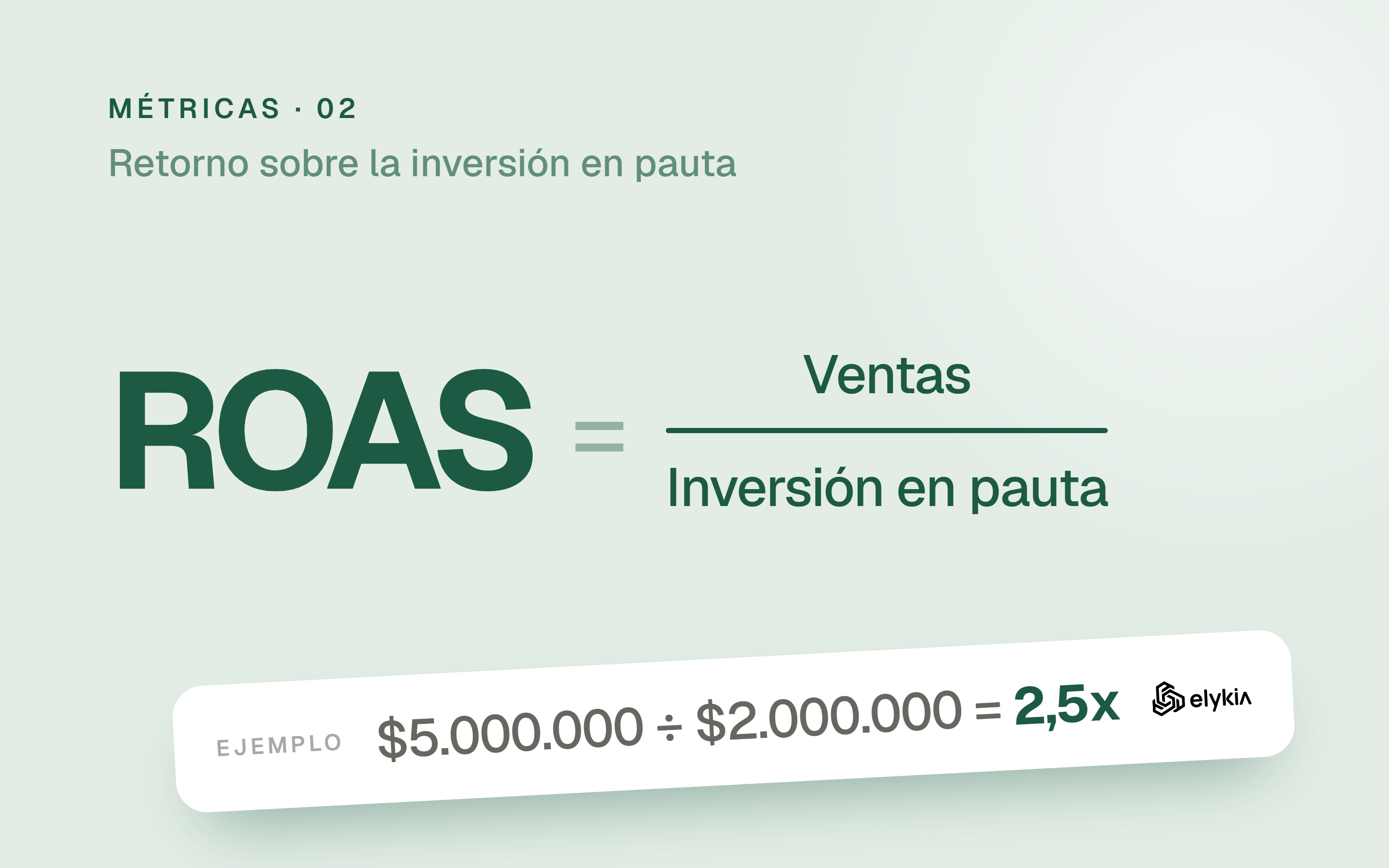
ROAS (return on ad spend) is how much revenue you bring in for every peso you put into ads. You calculate it by dividing the sales your ads drove by what you spent on them.
Sounds simple, but the sales your ads drove come from each platform's own reporting: they lose data (iOS, ad blockers, device switching), and on top of that, Meta and Google both take credit for the same sale.
The result: Meta tells you your campaign has a 3.7x ROAS, when it's actually 2.4x.
In short
- ROAS = sales ÷ ad spend.
- ROAS measures revenue, not profit: to know whether a campaign is actually making you money, you have to compare it to your break-even ROAS.
- If you calculate each campaign's ROAS using the sales Meta or Google report, the number doesn't reflect reality. We explain why below.
How do you calculate ROAS?
ROAS = sales for the period ÷ ad spend for the period
- Sales: your revenue from the sales your ads drove during the period.
- Ad spend: what you spent on ads over that same period, adding up Meta, Google, TikTok and the rest.
It's written as a multiple (2.5x) or as a percentage (250%), which mean the same thing. But 250% doesn't mean you made 250%: it means you brought in $2,50 for every $1 of ad spend, before paying for the product, shipping and everything else.
Example: ROAS for a Shopify store
An apparel store on Shopify spends $2.000.000 across Meta and Google in October:
| Spend | Sales | ROAS | |
|---|---|---|---|
| Meta | $1.400.000 | $3.300.000 | 2.4x |
| $600.000 | $1.700.000 | 2.8x | |
| Total | $2.000.000 | $5.000.000 | 2.5x |
For every peso of ad spend, the store brought in $2,50. And breaking it down by channel reveals something the total hides: Google brings in $2,80 per peso and Meta, $2,40.
How is ROAS different from ROI?
| ROAS | ROI | |
|---|---|---|
| Formula | Sales ÷ ad spend | (Profit − investment) ÷ investment |
| Measures | How much revenue you bring in | How much you earn |
| Subtracts costs | No | Yes |
These are the two most commonly confused metrics, and a high ROAS can mean a negative ROI. If you spend $100 on ads and sell $300, your ROAS is 3x. But if out of that $300 you're left with $90 after product, shipping and fees, your ROI is ($90 − $100) ÷ $100 = −10%: you tripled your spend in revenue and still lost money.
What's a good ROAS?
One that's above your break-even ROAS, the point at which your ads pay back exactly what they cost. You calculate it like this: 1 ÷ contribution margin, which is what you keep from each sale after product cost, VAT, fees and shipping.
In the example, the store keeps $40 out of every $100 it sells, a 40% margin. Its break-even ROAS is 1 ÷ 0.40 = 2.5x:
- With its total ROAS of 2.5x, the ads break even.
- Google, at 2.8x, makes money.
- Meta, at 2.4x, loses a little on every sale.
A store with a 60% margin makes money at a 2x ROAS; one with a 25% margin needs more than 4x. We walk through it with all the costs of a Tiendanube store in Break-even ROAS.
Why is the ROAS Meta and Google show you wrong?
Because the sales it's calculated from are reported by each platform, and they get it wrong for three reasons.
1. They take credit for the same sale. If someone saw your ad on Instagram without clicking and later bought through Google, both Meta and Google claim that sale. There was one sale; the reports show two.
In the example, Meta's ads drove $3.300.000, but Meta claims around $5.200.000. Its ROAS shows up as 3.7x instead of 2.4x: with a 2.5x break-even, it tells you the campaign is profitable when it's actually losing money. We explain it in The same sale, counted three times.
2. They're missing data. Between iOS, ad blockers and device switching, sometimes the pixel doesn't see a purchase, and Meta fills in the gap with estimates.
3. Added together, they over-claim. Meta, Google and the rest together claim 88% of stores' revenue; Elykia attributes 58% to ads.
How do you see each campaign's ROAS without Meta's inflation?
By connecting your store (Tiendanube, Shopify, VTEX, WooCommerce and more) and your ad accounts to Elykia.
It reconstructs each customer's journey, click by click, and sees what the platforms can't: purchases from iPhones, users with ad blockers, and device switching. On top of that, it counts every sale only once, even if the customer went through both Meta and Google.
With that, you get the real ROAS for every channel, campaign and ad. And all in one place: how much profit each campaign brings you, how much each customer is worth including repeat purchases, the journey behind every purchase, and all of it ready to ask Claude about.
What you get with Elykia:
- More revenue on less spend. You cut the campaigns that only look like they're performing and move that money to the ones that actually pay back.
- Scale with confidence. Before raising your budget, you know which campaign is above your break-even and which isn't.
- Better customers from Meta. You send back the sales Elykia tracks, so its algorithm learns from people who buy, not from clicks.
Frequently asked questions
Why doesn't my Meta ROAS match my sales?
Because Meta claims sales that its ads didn't drive on their own: it counts people who saw the ad without clicking and bought later through another path. For every 100 sales its ads drive, it claims 157.
Can I add up the ROAS from each platform?
No. If Meta says 4x and Google says 3x, your business's ROAS isn't 7x or 3.5x: each one claims sales the other is also claiming. To see how all your ads perform together, the metric to use is MER.
How often should I check ROAS?
Weekly to spot trends, and monthly to make budget decisions. Checking it every day makes you react to noise: one day with few sales doesn't mean the campaign stopped working.